Answering services for IT companies and MSPs: who opens the ticket, who wakes the on-call tech, and what it costs
A server down at 2 a.m., a ransom note on a screen, a user locked out, a business with 40 seats asking about managed IT: each call to an IT company needs its own path. Here is how the answering services built for MSPs, and the general ones with IT pages, get the ticket into your PSA, wake the on-call tech and handle password requests. We also price them at 100 and 250 calls a month.
IT companies usually answer their own phones between tickets, and the calls that matter most tend to come when the office is closed. On 26 November 2026 we read the IT, MSP, integration and pricing pages of 15 AI receptionists and live answering services. We also checked the settings an MSP would use in our own Upfirst test account and read government advice on social engineering aimed at help desks. The call paths come first below, then the services that put tickets in your PSA and wake your on-call tech, and what each costs.
Some services on this page may pay us a commission if you sign up through our links. It doesn't change what we report: prices and features come from each vendor's own pages, read 26 November 2026. How we compare.
Why IT companies miss calls
Support work does not stop at closing time. The BLS notes that because computer support services may need to be available 24 hours a day, some support specialists work nights or weekends; their median pay in 2025 was $62,890 a year, or $30.24 an hour. (BLS, Occupational Outlook Handbook)
A team that works from 8 a.m. to 6 p.m. on weekdays covers 50 of the 168 hours in a week. That leaves 118 hours of nights and weekends for an on-call rotation, an answering service or both, plus the daytime overflow when every tech is already on a call. The answering service has two jobs in those hours: get the few calls that cannot wait to a person, and turn the rest into tickets.
The calls on an IT company's line
The MSP pages we read agree on the sorting questions: is the caller a client, how many users are affected, has work stopped, and is it a security problem. Here is where each kind of call should go:
Caller says
Where it should go
The server is down, the network is out, nobody can work
Top priority: a warm transfer or a page to the on-call tech straight away, with the ticket already open. Dialzara asks how many users are affected and whether work has stopped; Smith.ai asks for the user count and the urgency.
A ransom note, a clicked phishing link, a hacked account
The security path: who, what and when, no technical advice, then the security on-call at once, as in Dialzara's separate intake for security incidents.
One user cannot print, a slow laptop, a VPN that keeps dropping
A ticket with the device, the error message and what the caller has already tried, and a callback during business hours.
Locked out, or asking for a password or MFA reset
A ticket for a technician, who checks the caller under your rules. The receptionist never asks for, reads out or resets a password.
Asking about an open ticket
Thread's Voice AI knows the caller's open ticket and keeps ticket details from callers who have not been verified; with other services, give updates only after your check.
Microsoft 365, Google Workspace or AWS is down
Callers hear that it is a known outage before a ticket is opened; CallBuzz updates its greeting from those providers' status pages.
A business asking about managed IT
Sales: the number of users and sites and the current setup, then a booked consultation or a warm transfer to the rep.
How a call to an IT company should go: prospects to sales; for clients, a security incident goes to the security on-call, work that has stopped goes to the on-call tech, and everything else becomes a ticket.
Password resets and caller checks
Help desks are a target. CISA's advisory on the Scattered Spider group, last revised on 29 July 2025, says the group targets large companies and their contracted IT help desks. Its members have posed as employees to get help-desk staff to reset passwords and move an employee's MFA to a device they control. On 4 May 2025 the UK's NCSC asked organizations to review how their help desks check a caller before a password reset, especially for accounts with high privileges. (CISA, AA23-320A; NCSC, 4 May 2025)
An answering service is one more door into that help desk, so it gets the strictest rules:
No passwords on the call. The receptionist never asks for, accepts or reads out a password, an MFA code or a one-time code.
No resets. A password or MFA request becomes a ticket for a technician, who verifies the caller under your policy.
No ticket details to unverified callers. Thread's Voice Shield keeps them from callers who have not been verified; with any other service, write the rule into the script. (Thread)
Admin accounts get extra care. The NCSC singles out Domain Admin, Enterprise Admin and Cloud Admin accounts. (NCSC)
Urgency is a warning sign. New Zealand's NCSC lists pressure, appeals to authority and bids for sympathy among the tactics in these calls, and advises deciding in advance what a caller must verify and what happens when they cannot. (NCSC New Zealand)
A summary of public guidance, not a security review; your own security policy decides.
Getting the ticket into your PSA
Most MSPs want each call to land in the PSA as a ticket on the right company and contact. The services get it there in three ways: they write into the PSA themselves, they send it through Zapier, Make or a webhook you set up, or they send structured details by email or text. This is what each vendor's own pages say:
Creates the ticket in HaloPSA during the call, with the contact, company and priority set from Halo's impact and urgency matrix; matches callers by phone number. Also listed on the ConnectWise Marketplace. (Halo; ConnectWise Marketplace)
PhoneFlowMSP phone system
Creates and qualifies tickets in HaloPSA, with client lookup. (Halo)
Its ConnectWise integration opens a new ticket or updates an existing one and can trigger ConnectWise's own notifications; with Autotask, its agents log service requests directly in the PSA. (ConnectWise; Autotask)
Logs tier-1 tickets; Slack and Zendesk among its integrations; no PSA named. (PATLive)
From each vendor's own pages, read on 26 November 2026. A PSA named on a vendor page is not proof of a native integration, so ask for a test ticket.
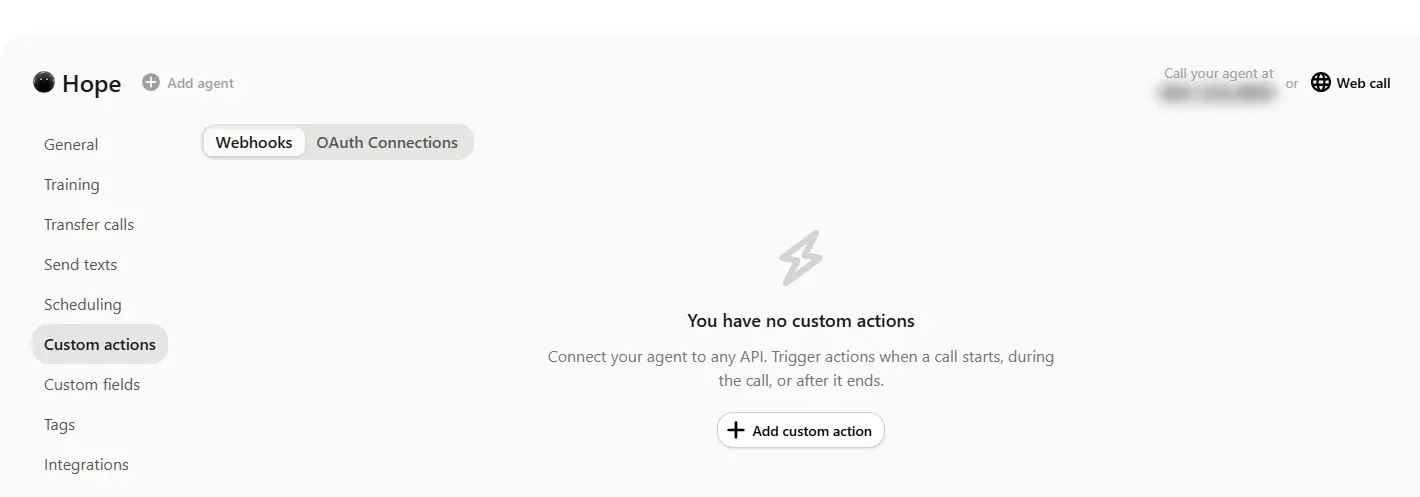
Custom actions in our Upfirst test account: webhooks or OAuth connections that run when a call starts, during the call or after it ends. From our Upfirst review.
This is where an AI receptionist without a PSA integration can still open the ticket: a webhook to your PSA's ticket API, run when the call ends. Whichever service you pick, ask to see one test call arrive as a ticket on the right company, with the priority set and the transcript attached, before you sign.
Waking the on-call tech
For a call that cannot wait, the receptionist has to reach a person, not a voicemail box. The vendors describe different ways of doing it:
Thread Voice AI calls your on-call rotation in order and reads out the ticket; the tech presses 1 to take it, and every attempt is logged on the ticket. It is included in the Voice AI license. (Thread)
CallBuzz texts the ticket to the on-call tech, who can claim it from the message; with no reply it moves to the next tech in the rotation, which you plan on a calendar weeks or months ahead. (Halo)
Dialzara sends P1 and P2 calls to the on-call engineer by phone call, text and email at the same time, on plans from $99. (Dialzara)
NextPhone's $599 Scale plan rings your team in order until someone picks up. (pricing)
Upfirst rings a rule's numbers one by one until someone answers (the ring time in our test account's form was 30 seconds), and with a warm transfer it briefs the tech before the handoff. (our test account)
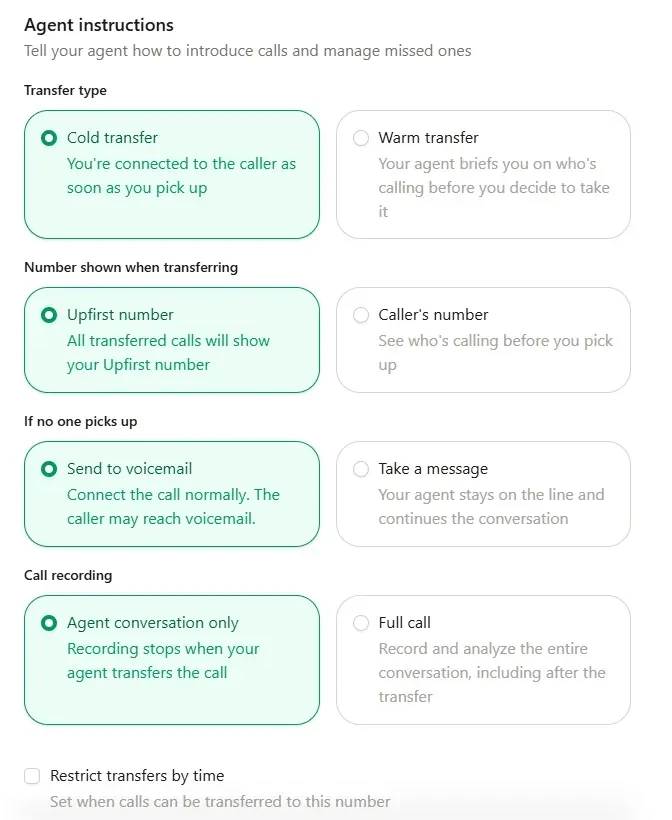
The second half of a transfer rule in our Upfirst test account: cold or warm transfer, which number the tech sees, what happens if no one picks up, and an option to limit the rule to set hours. From our Upfirst review.
For an on-call rule, three of these settings matter. A warm transfer lets the tech hear the problem before taking the call. Take a message, as the fallback when no one picks up, keeps the caller talking to the agent instead of a voicemail box. And a time limit keeps the rule to your on-call hours.
AI receptionists for IT companies
Two of these, Thread and CallBuzz, were built for MSPs; the others are general AI receptionists with IT or MSP pages, and for Upfirst we checked the settings in our own account. For each we note how it handles tickets and on-call, and the prices on its pricing page, read 26 November 2026. The ranking puts PSA tickets and on-call paging first, then published prices.
1
Thread Voice AI
Built for MSP service desks: it answers after-hours and overflow calls, recognizes the caller and their open ticket, and writes the ticket, transcript and time entry into ConnectWise, Autotask or Halo PSA. When a ticket matches your rules, it phones the on-call rotation in order and reads out the ticket; the tech presses 1 to take it.
Price
$34 per managed customer a month for AI Pro, plus $15 for Voice AI
PSA
ConnectWise, Autotask, Halo PSA
On-call
Included: rings your rotation in order
Guarantee
60-day money-back if you see no positive ROI
Why it fits
Voice Shield keeps ticket details from callers who have not been verified, and a tech can listen to any call live or pause the transcription. (Thread)
Priced per managed customer, not per minute, so a long outage call costs nothing extra; at $49 a customer, 20 managed customers come to $980 a month. (pricing)
Watch for
Voice AI is an add-on to Thread's AI Pro service-desk plan, so it fits an MSP that runs its desk in Thread. (pricing)
2
Dialzara
The most detailed MSP script among the general AI receptionists: it sorts calls from P1 to P4 by how many users are affected, whether work has stopped and which system is affected, and sends P1 and P2 calls to the on-call engineer by call, text and email at once. Ransomware, phishing and unauthorized-access reports get their own intake, which goes straight to your security team.
Price
$29 / 60 min; $99 / 220; $199 / 500; $349 / 1,000
Extra minutes
$0.48 down to $0.35
Tickets
By email, SMS or webhook
Trial
7 days, no setup fee
Why it fits
Identifies the client company by the caller's phone number, then routes by that client's SLA tier, dedicated team and escalation preferences. (Dialzara)
Watch for
Its plan table lists after-hours rules, escalation and warm transfers from the $99 plan; the $29 plan has blind transfers only. (pricing)
An AI answering service built for MSPs on HaloPSA: it matches callers to Halo contacts by phone number and writes the ticket during the call, with impact and urgency mapped to your Halo priority matrix. High-priority and after-hours tickets go by text to the on-call tech, who can claim them from the message; with no reply, CallBuzz moves to the next tech in the rotation.
Price
Not published
PSA
HaloPSA; also on the ConnectWise Marketplace
On-call
Text with the ticket; claim it by text; next tech if no reply
Outages
Watches Microsoft 365, Google Workspace and AWS status pages
Why it fits
Sales calls are qualified, the rep gets a text with the caller's details, and if the rep is available the call is warm-transferred. (Halo)
4
Smith.ai
AI for high-volume ticket intake and live receptionists for urgent escalations, in a hybrid setup. Intake covers the issue type and severity (P1, P2 or P3), the systems and number of users affected, error messages and urgency, and its IT page lists automatic ticket creation in ConnectWise, Autotask and Kaseya.
Price
Free AI plan for 25 calls; $150 for 75; live receptionists from $300 for 30 calls
Its IT support page describes triage and ticket creation: the agent asks clarifying questions, puts technical terms into plain language for end users, and pushes call data into ticketing tools through its API and Zapier. Billing counts unique callers, so a client who phones three times in a month counts once.
Flat pricing that does not change with call length: $199 a month for unlimited inbound calls. Getting tickets into a PSA needs the $299 Growth plan, which adds Zapier, Make, webhooks and its API; NextPhone's IT article says ConnectWise and Autotask connect through Zapier.
Price
$199 Pro; $299 Growth; $599 Scale
Calls
Unlimited inbound, no per-minute charges
Transfers
Up to 10 destinations on Growth; Scale rings your team in order
Trial
7 days
Why it fits
Setup is free on every plan, and its team builds and tunes the agent from the Growth plan (pricing; IT article).
7
Upfirst
No IT page, but the tools an MSP needs are in the app, as we saw in our test account. Custom actions call any API when a call starts, during it or after it ends, which is where a webhook to your PSA goes. Transfer rules ring your on-call numbers in order, with a warm handoff if you choose it.
Rosie's IT article suggests trigger words for transfer rules: outage, security issue, breach, server down, internet down, email outage, locked out and urgent. Live and warm transfers start on the $149 plan.
Price
$49 / 250 min; $149 / 1,000; $299 / 2,000
Transfers
Warm and live transfers from $149
Setup
Learns from your website or Google Business Profile
Trial
7 days
Why it fits
Its IT article lists caller context to capture: existing client, location, affected users, business impact and any ticket number (Rosie; pricing).
Tier-1 ticketing: it logs the issue, captures the details and escalates to your team. People only, around the clock including weekends and holidays; Slack and Zendesk among its integrations; Spanish from 8 a.m. to 10 p.m. Eastern at no extra charge. (PATLive)$49 + $2.99 a minute; $189 for 100 min, then $2.09 (pricing)
AnswerFirstTrial: not stated; 30-day risk-free guarantee
Routes critical requests to your on-call technicians and takes non-urgent calls as messages; agents open or update tickets in ConnectWise and log requests in Autotask; no extra fees for nights, weekends or holidays.$30 a month + $1.60 to $1.95 a minute; billed by the second
An Autotask integration and help-desk answering by phone or web chat; after-hours minutes cost the same as daytime ones, and Spanish is included.Plans from 100 to 10,000 minutes; prices not on its IT page
Tier 1 technical support: agents log tickets, escalate callers by your rules and schedule follow-ups, and can cover your on-call hours. (MAP)$49 + $1.37 a minute; $179 for 125 min, then $1.30 (pricing)
Tier 1 support with first-contact resolution as the aim, escalating complex problems; Jira, Zendesk, Slack and Zapier among its integrations; no extra charge after hours. (Answering Service Care)Live $40 + $1.75 a minute; $179 for 100 min (pricing)
Custom scripts, messages, appointments and lead capture; its ConnectWise integration adds callers as contacts. (AnswerConnect)$350 for 200 min + $49.99 setup; $395 for 300 (plans)
Live receptionists take urgent escalations and upset clients, alongside its AI plans. (Smith.ai)$300 for 30 calls; $810 for 90; $2,100 for 300 (pricing)
If after-hours pricing matters: AnswerFirst, AnswerForce and Answering Service Care say after-hours minutes cost the same as daytime ones, PATLive answers around the clock on every plan, and AI receptionists cost the same at any hour.
When you need a help desk instead
An answering service takes the call, opens the ticket and wakes the right person. It does not fix the problem. If you want your clients' users helped at night, that is an outsourced help desk:
ConnectWise Help Desk Services offers business-hours, after-hours or 24/7 support for MSP clients' users, reported a 75% resolution rate for the second quarter of 2024, and is switched on per client site with any ConnectWise RMM package. (ConnectWise Marketplace)
MAP Communications offers Tier 1 technical support, and Answering Service Care Tier 1 support with basic troubleshooting, on top of answering. (MAP; Answering Service Care)
The two can work together: an answering service or AI receptionist for intake and paging, and your own techs or a help-desk partner for the fixes.
What it costs at 100 and 250 calls a month
What 100 and 250 two-minute calls a month cost on each service's lowest published plan that fits IT work. Base it on your busiest month, and on longer calls if your intake asks the priority questions.
Answering Service Care (live)Live answering service
$329
$639
PATLiveLive answering service
$349
$759
AnswerConnectLive answering service
$350
$760
Smith.ai live receptionistsLive answering service
$915
$2,100
Lowest published plan with call transfers, from each vendor's pricing page, read on 26 November 2026 (Smith.ai's and Answering Service Care's on 20 November 2026). Dialzara is priced from its $99 plan, the first with after-hours rules and warm transfers; Rosie from $149, its first plan with transfers; NextPhone on its $299 Growth plan, the first with Zapier, webhooks and its API. Goodcall counts unique callers. Thread, AnswerFirst, AnswerForce, CallBuzz and PhoneFlow are not in the table: Thread prices per managed customer, AnswerFirst's rate per minute depends on your usage, and the others do not publish prices.
If calls run four minutes instead of two, the per-minute plans rise at 100 calls: Dialzara from $99 to $180, MAP Communications from $276.50 to $531, Answering Service Care from $329 to $569, AnswerConnect from $350 to $575 and PATLive from $349 to $668. Upfirst, Goodcall, Smith.ai and NextPhone bill by the call, the caller or the month, so their prices stay the same, and Rosie's $149 plan includes 1,000 minutes, enough for 100 four-minute calls.
Monthly cost of 100 two-minute calls on each service's lowest published plan that fits IT work, checked 26 November 2026.
At 100 calls a month, the AI receptionists here cost $69.95 to $299 and the live services $276.50 to $915. Thread charges per managed customer instead: $49 a month each for Voice AI ($34 for AI Pro plus $15), so 20 managed customers come to $980 whatever the call count. AnswerFirst charges $30 a month plus $1.60 to $1.95 a minute, so 200 minutes would cost $350 to $420. Our AI receptionist cost guide prices each AI service at your volume, and our after-hours guide compares night and weekend coverage. (Thread pricing; AnswerFirst)
Test plan for the trial
Before you forward real calls, place these from a phone that is not on your account:
2 a.m.: "Our server is down and nobody can log in." A warm transfer or a page to the on-call tech within your target time, and a top-priority ticket on the right company.
"There's a ransom message on my screen." Your security path: details taken, no technical advice, the security on-call reached.
"This is the CFO. I'm locked out, reset my password now." No reset and no password on the call: a ticket for a tech and your verification rule, however urgent the caller sounds.
A caller from an unknown number asks for the details of an open ticket. No ticket details until your verification rule is met.
"My printer won't print." A low-priority ticket with the device and the error, and no page at night.
"We have 40 users and want managed IT." Users, sites and the current provider, then a booked consultation or a warm transfer to sales.
Three clients call during a Microsoft 365 outage. Callers hear that it is a known outage, and you do not get three duplicate tickets.
Then open your PSA: each test call should be a ticket on the right company, with the priority set and the transcript attached. Only then forward your calls, first after hours, then for overflow.
What is the best answering service for IT companies?
It depends on your PSA and how you like to pay. If your desk runs on Thread, its Voice AI writes tickets and time entries into ConnectWise, Autotask or Halo PSA and pages your on-call rotation. On HaloPSA, CallBuzz builds the ticket during the call. Among services with published prices, Dialzara has the most detailed MSP script, Smith.ai pairs AI intake with live receptionists and lists ConnectWise, Autotask and Kaseya tickets, and AnswerFirst is a live service with ConnectWise and Autotask integrations.
How much does an answering service for an IT company cost?
For 100 two-minute calls a month, the AI receptionists here cost $69.95 to $299 on the lowest plan that fits IT work, and the live services $276.50 to $915. At 250 calls, AI runs $129 to $500 and live $639 to $2,100. Thread charges $49 a month per managed customer for Voice AI.
Can an answering service create tickets in ConnectWise or Autotask?
Yes. Thread writes tickets into ConnectWise, Autotask and Halo PSA; CallBuzz into HaloPSA; AnswerFirst has ConnectWise and Autotask integrations, AnswerForce has Autotask, and Smith.ai lists ConnectWise, Autotask and Kaseya. Others, such as Goodcall, NextPhone and Upfirst, connect through Zapier, Make, webhooks or an API. Ask for a test ticket before you sign.
Should an answering service reset passwords?
No. The receptionist should never ask for, take or give out a password or an MFA code, and resets should go to a technician as a ticket. CISA warns that the Scattered Spider group has posed as employees to get help desks to reset passwords and move MFA, and the UK's NCSC asks organizations to review how their help desks check callers before a reset.
What is the difference between an answering service and an outsourced help desk?
An answering service answers, opens the ticket and escalates; it does not fix problems. An outsourced help desk, such as ConnectWise Help Desk Services, troubleshoots and resolves issues for your clients' users. MAP Communications and Answering Service Care also offer Tier 1 support.
Do answering services charge more for nights and weekends?
AnswerFirst, AnswerForce and Answering Service Care say after-hours minutes cost the same as daytime ones, PATLive answers around the clock on every plan, and AI receptionists cost the same at any hour.
Vendors' IT, MSP, integration and pricing pages, read 26 November 2026: Dialzara, Smith.ai, Goodcall, NextPhone (its IT article updated 24 November 2026), Rosie (IT article of 12 June 2026), Upfirst, PATLive, AnswerFirst (IT, ConnectWise and Autotask pages), AnswerForce and Datto's AnswerForce page, MAP Communications, Answering Service Care, AnswerConnect (MSP page, ConnectWise integration and plans)
Screenshots: our Upfirst test account, 16 October 2026
AI receptionist and live prices from the same plan data as our comparison and virtual receptionist guide, re-read for these vendors 26 November 2026 (Smith.ai and Answering Service Care on 20 November 2026)