How to forward your business calls to an AI receptionist
Retain your number and route incoming calls to the AI by using a single code or a single setting: all calls, or just the ones you fail to answer. Included are the codes for each mobile carrier, landlines, and the major business phone systems, the iPhone option that prevents forwarding, and a five-minute test.
An AI receptionist can receive calls through its own dedicated phone number. If you want it to handle the number your customers already use, you simply forward that line to it, either by entering a code from your phone or by changing one option in your phone system. No equipment is moved, nothing is installed, and turning forwarding back off restores your line to its original state. This guide explains the relevant codes and settings, includes links to each carrier’s help page, and describes the steps the AI receptionists we set up will ask you to take.
Every call, or only the ones you miss
There are two methods for forwarding. With unconditional forwarding, every call is sent directly to the AI, which can then transfer any calls that require your attention. By contrast, conditional forwarding means only missed calls are forwarded: your phones ring first, and if no one answers, the line is busy, or the phone is turned off, the call goes to the AI.
Conditional forwarding is a good fit for owners who handle most calls personally but want AI support for overflow and after-hours coverage. By contrast, forwarding all calls is better for businesses that want every caller screened and scheduled. Our AI phone answering guide explains both, and porting.

Mobile carriers: the codes
For a mobile phone line, activate call forwarding by entering a brief code and then the AI’s number, after which you press the call button. The exact codes vary by carrier:
| Carrier | Every call | Only missed calls |
|---|---|---|
| AT&T | **21*[AI number]#off: ##21# | **61*[AI number]#off: ##61# |
| Cricket | Same as AT&T | Same as AT&T |
| T-Mobile | **21*1[AI number]#off: ##21# | **61*1[AI number]#off: ##61# |
| Mint Mobile | Same as T-Mobile | Same as T-Mobile |
| Verizon | *72[AI number]off: *73 | *71[AI number]off: *73 |
| Xfinity Mobile | *72[AI number]off: *73 | *71[AI number]off: *73 |
Substitute the brackets with the 10-digit number for your AI receptionist. The Verizon and T-Mobile codes are taken from their respective support pages, while the AT&T, Cricket, Mint, and Xfinity Mobile codes come from 800.com's carrier list, dated 8 August 2026. Read 20 November 2026.
AT&T and T-Mobile likewise provide codes solely for calls that are busy and for a handset that is powered off or outside coverage. With T-Mobile, you can choose the ringing duration before a missed call is forwarded, anywhere from 5 to 30 seconds, by entering two stars plus the number of seconds before the closing #:
**61*1[AI number]**20# (T-Mobile: forward unanswered calls after 20 seconds; T-Mobile short codes)
##004# (T-Mobile: resets all call forwarding to the default; T-Mobile short codes)
Verizon’s *71 sends any calls you fail to pick up to another number, while *73 disables forwarding entirely. According to AT&T, you can adjust forwarding only on the handset itself, and it takes precedence over your wireless voicemail. (Verizon; AT&T)
The act of forwarding usually does not incur an added fee, but the call that gets forwarded may still be charged. Verizon counts forwarded calls toward your plan minutes unless those minutes are unlimited, while AT&T charges for the duration of those calls and may also apply long-distance fees. Neither carrier will forward calls to an international number. (Verizon; AT&T)
iPhone: turn off Live Voicemail first
If a business line routes to an iPhone, disable Live Voicemail before anything else. Since iOS 17, it is enabled by default, and Verizon’s support page says conditional forwarding is one of the services that requires it to be turned off; Upfirst’s setup guide issues the same caution. Open Settings, then Apps, Phone, Live Voicemail, and turn it off. (Verizon; Upfirst)
Landlines
The majority of landline services use *72 plus the AI’s number to route all incoming calls, while *73 turns that forwarding off. AT&T’s business phone also includes codes for missed and busy calls, along with a safe forwarding code that keeps calls moving during a network outage or power failure: (Upfirst; AT&T)
| AT&T business phone | Turn on | Turn off |
|---|---|---|
| Every call | *72[AI number]# | *73# |
| No answer | *92[AI number]# | *93# |
| Busy | *90[AI number]# | *91# |
| Network or power outage (safe forwarding) | *372[AI number]# | *373# |
From AT&T's small business support page, read 20 November 2026.
Business phone systems
In a business phone system, call forwarding is configured in the app or through the admin portal rather than by entering a code. In four common systems, here is where you can find it:
- RingCentral. In Settings, go to Phone, then Call handling, and select Edit; within Missed calls, pick Forward to external number for work hours, after hours, or both. (RingCentral)
- Quo (formerly OpenPhone). Within the call flow builder, select Forward all calls and type in the AI’s number, or insert a business hours step so forwarding happens only after hours. Quo notes that forwarded calls are neither recorded nor transcribed, are counted twice against usage, may be sent only to US or Canadian numbers, and cannot be forwarded before voicemail when calls go unanswered. (Quo)
- Ooma Office. Within the End User Portal’s Call Handling settings, route incoming calls to a forwarding number whenever every device is offline, and decide whether the AI sees the caller’s number or your own. Keep Require key press on answer turned off, because it pauses until a person presses 1. (Ooma)
- Google Voice. Google notes in its help materials that sending a Google Voice number to an automated system is not supported, and it instead directs users to an auto attendant in Google Workspace. Even so, Upfirst’s guide still outlines steps for adding its number as a forwarding phone, so you should test it with care or simply share the AI’s number with callers directly. (Google Voice help; Upfirst)
For Dialpad, Nextiva, 8x8, Zoom Phone, Microsoft Teams Phone, and other platforms, the setup instructions are generally provided in your AI vendor’s guide; Upfirst’s guide includes 18 phone systems. (Upfirst)
What the AI receptionists ask you to do
After its own setup is complete, every AI receptionist we set up asks for this step:
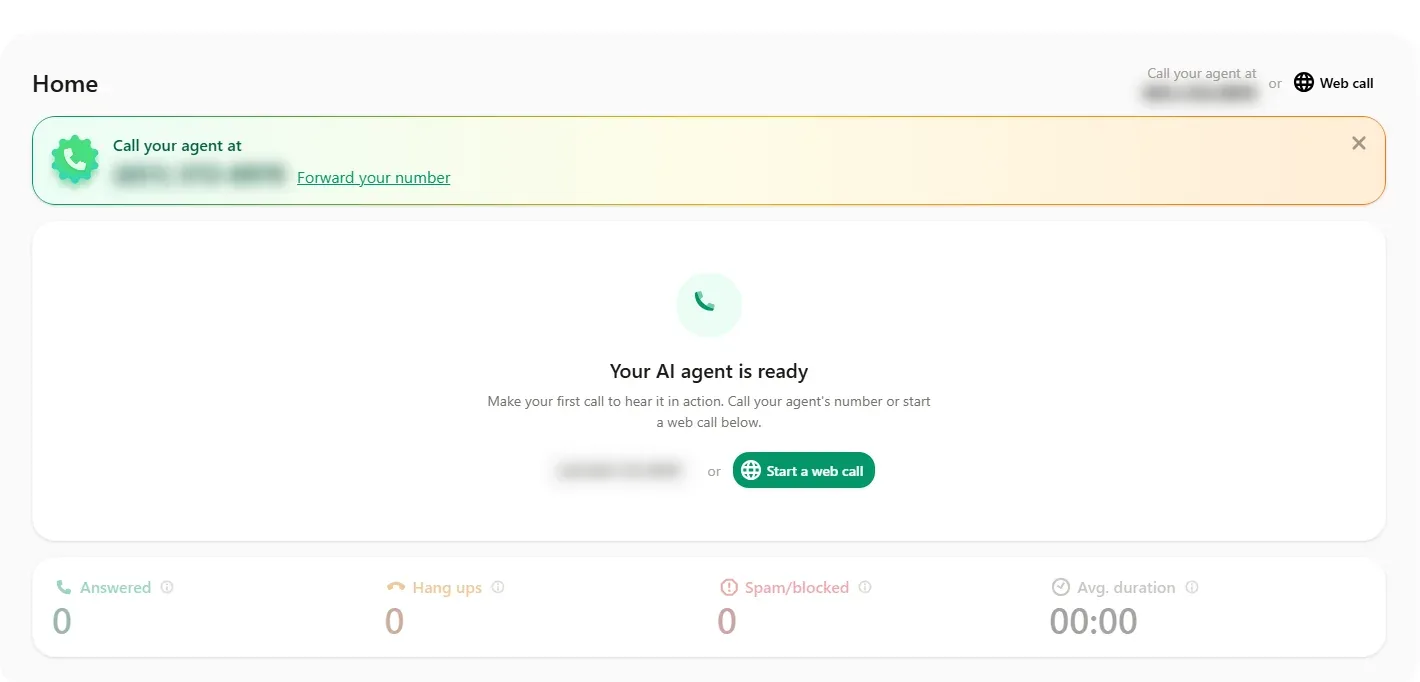
- Upfirst. On Upfirst’s main screen, you can see the agent’s number along with a prompt to forward your own number. Its help center also includes codes for nine US mobile carriers, landlines, and 18 phone systems, plus the Live Voicemail warning. (our review)
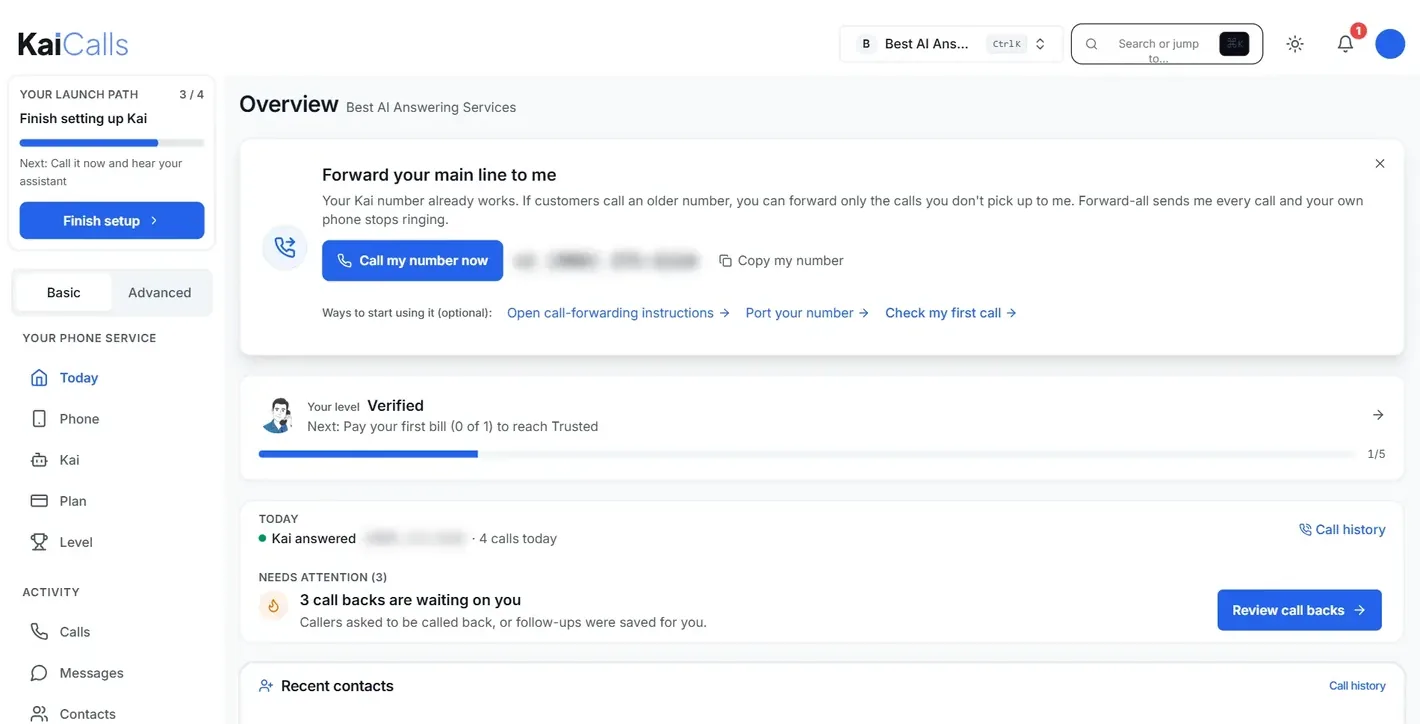
- KaiCalls. KaiCalls’ overview includes a card labeled “Forward your main line” with your Kai number, plus a call button and links to forwarding and porting instructions. There is also an optional setting that makes your own phone ring first. (our review)
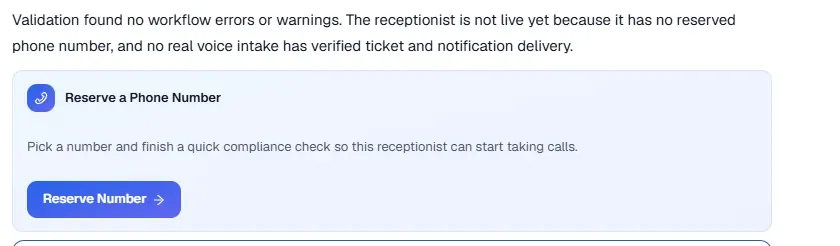
- My AI Front Desk. My AI Front Desk’s receptionist does not become active until you reserve a number in the app. After that, you forward your business line to it, because it does not port numbers in. (our review)
Test it before you rely on it
Before depending on it, test it from a phone other than the one being forwarded:
- Dial your company line and allow it to keep ringing beyond your set timer. The AI should pick up, and the recap should be delivered to you.
- Make sure the AI sees the caller’s phone number rather than your own, so any return calls or messages are sent to the correct person.
- If your phone system routes calls by schedule, call after hours; if it also sends busy calls onward, call when you are already on a call.
- Deactivate call forwarding and place the call once more, so you learn how to reverse the setting; afterward, review your next phone bill for any forwarded minutes.
Forwarding lets you retain your number with your carrier. By contrast, transferring the number itself to the AI provider is known as porting; our guide to AI phone answering contrasts the services that port numbers with those that only forward calls.
Questions owners ask
How do I forward only missed calls to an AI receptionist?
For calls that go unanswered, enter your carrier’s forwarding code: on AT&T and T-Mobile, dial **61* followed by the number and #, with T-Mobile requiring a 1 before the number; on Verizon, use *71 plus the number. If you’re using an iPhone, disable Live Voicemail first.
What are the call forwarding codes for AT&T, Verizon and T-Mobile?
For AT&T and T-Mobile, you can route all calls by dialing **21* followed by the number and #; on Verizon, use *72 plus the number. To turn forwarding off, enter ##21# on AT&T and T-Mobile, or *73 on Verizon. On T-Mobile, a 1 is added before the 10-digit number.
Why do calls still go to voicemail after I set up forwarding?
For an iPhone, Live Voicemail must be disabled; Verizon includes conditional forwarding in the set of services that require it to be turned off. Certain phone systems, including Quo, are unable to send unanswered calls onward before voicemail picks up. In addition, with AT&T, the code must be entered directly from the phone that is being forwarded.
Does call forwarding cost extra?
Usually not for the feature itself: Verizon says that most plans do not impose a monthly charge for it. However, forwarding a call may still have a cost. If your plan is not unlimited, Verizon deducts it from your minutes; AT&T charges based on the call’s duration; and your AI receptionist tallies each call it handles.
Can I forward a Google Voice number to an AI receptionist?
Google states that sending a Google Voice number on to an automated service is not supported. Even so, some AI providers, including Upfirst, still offer instructions for connecting their number, so you should test it before depending on it, or else provide callers with the AI’s number.
Sources
- Carriers, read 20 November 2026: Verizon, Call Forwarding FAQs; Verizon, Apple iPhone: turn Live Voicemail on or off; T-Mobile, self-service and short codes; AT&T, use call forwarding; AT&T small business, manage call forwarding; 800.com, call forwarding codes by mobile carrier (8 August 2026)
- Phone systems, read 20 November 2026: RingCentral app, user call forwarding; Quo, call forwarding; Ooma Office, forwarding calls when devices are offline; Google Voice help, linked numbers
- AI receptionist vendors: Upfirst, forward all your calls and forward your missed calls, read 20 November 2026; our own Upfirst and My AI Front Desk accounts (16 October 2026) and KaiCalls line (19 October 2026)