KaiCalls review: the $10 backup receptionist, tested with two calls
We taught a KaiCalls line our business in plain words, called it twice with the questions owners ask about any AI answering service, and read what came back: the transcripts, the call pages and the email with a priority score.
How we tested. KaiCalls set up a line for this site on request and waived the first month of its Kai Line plan so we could test it; it has not paid for this page and did not see it before publication. On 19 October 2026 we taught the line about our business in plain words, the way an owner would, and made two calls from the browser with the same questions we asked Upfirst and My AI Front Desk. The caller's name and phone number are blurred in every image. Links to KaiCalls may earn us a commission (disclosure).
What is KaiCalls?
KaiCalls sells a business phone line with an AI secretary called Kai built in. The idea it is built around is backup: your own phones ring first, and Kai picks up the calls you miss, after hours or when the line is busy, then sends you what the caller wanted. You can also forward every call to it and use it as a full receptionist. It joined our home page comparison on 12 October 2026 with the lowest entry price we have found: $10 a month.
- Job
- Answers the calls you miss (or all of them), takes messages, books on a connected calendar, texts and calls customers back
- Price
- $10 a month for about 20 answered calls; $79 for about 170; $349 for about 800 with three office lines
- Over the allowance
- No per-minute overage; Kai keeps answering and KaiCalls recommends the next plan, which you can decline
- Trial
- $2 for the first week on every plan; a free browser demo; 30-day money-back guarantee on paid plans
- Taught by
- Plain-language instructions: you type what should change and Kai rewrites its own script, shown as a red and green diff before you save
- Our test
- Two browser calls, 5 min 20 s and 4 min 27 s, 19 October 2026
- After a call
- An email within about a minute with a priority, a score out of 100, a summary and the full transcript; a call page with a two-channel recording
How much does KaiCalls cost?
Three flat plans, priced on the calls Kai answers rather than on minutes, so a long call costs the same as a short one (KaiCalls pricing page, read 19 October 2026):
| Plan | Price a month | Calls Kai answers | Per call | Lines |
|---|---|---|---|---|
| Kai Backup | $10 | About 20 | $0.50 | 1 number; extra lines $15 a month |
| Kai Line | $79 | About 170 | $0.46 | 1 number; extra lines $15 a month |
| Kai Office | $349 | About 800 | $0.44 | 1 number and 3 office lines; more at $29 a month |
No setup fee, no annual contract, unlimited team members with no seat fees, number porting on every plan. Texting needs carrier approval; on Kai Backup it is a $49 one-time registration plus $15 a month, on the paid plans it is included once the trial ends. Taxes and regulatory fees are billed on top.
The allowances are approximate (“about 20”), and KaiCalls told us by email on 13 October 2026 that the line never stops when you go over: it suggests the next plan and you can stay where you are. For a shop whose phones are answered most of the day, $10 covers a missed call or two on most working days. If Kai answers everything, the $79 plan is the comparison point: our calculator puts it beside the other thirteen services at your own call volume.
Is there a free trial?
Not of the live phone line. Every plan starts at $2 for the first week and then bills monthly, with a 30-day money-back guarantee on paid plans; before paying, a free browser demo lets you hear Kai. Our line was set up by KaiCalls with the first month at $0 (the receipt email says “Payment received for Kai Line, Amount: $0”), so we did not go through the $2 checkout ourselves.
How long does setup take?
The dashboard calls it a launch path with four steps: Kai knows your business, it is answering calls, it is always on, and you call it to hear it. Our line arrived with the first three done, a greeting (“Thanks for calling Best AI Answering Services, this is Kai. How can I help?”), a voice called Elliot and no transfer number. The fourth step, a test call, is two buttons away: Test call (browser) on the agent page, or your own phone.
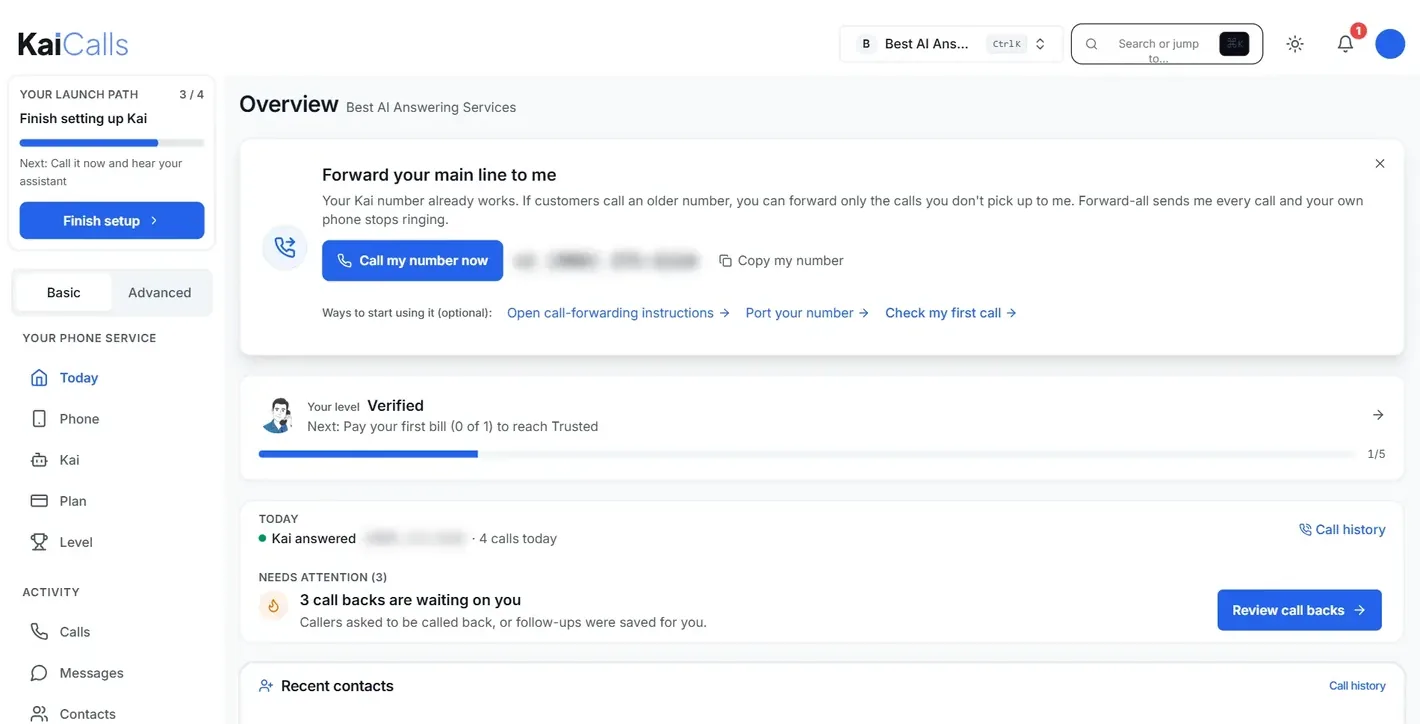
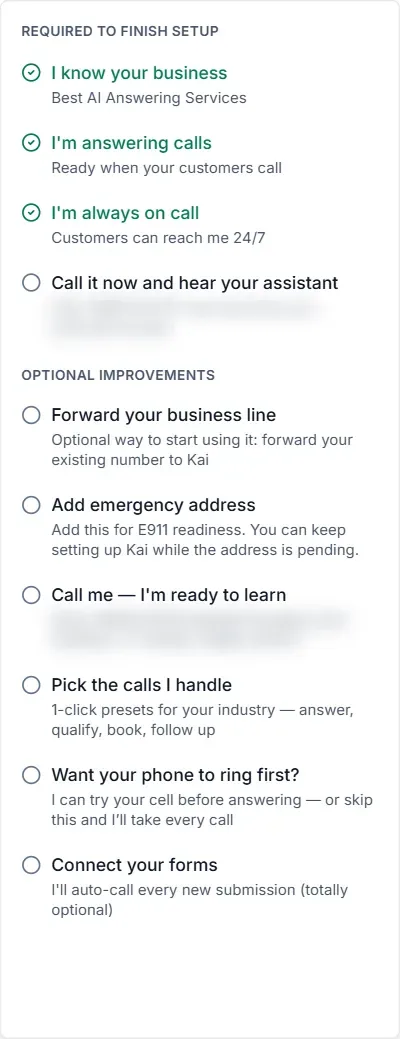
Optional steps sit underneath: forward your business line, add an E911 address, call the line and talk Kai through your business, pick presets for your industry (answer, qualify, book, follow up), ring your cell first, and connect your web forms so Kai calls every new submission. There is also an account “level” (ours read Verified, with up to 20 outbound calls a day while on trial, texting, number purchase and email campaigns of up to 1,000 a day), with the next level unlocked by paying the first bill.
Can it learn your business from your website?
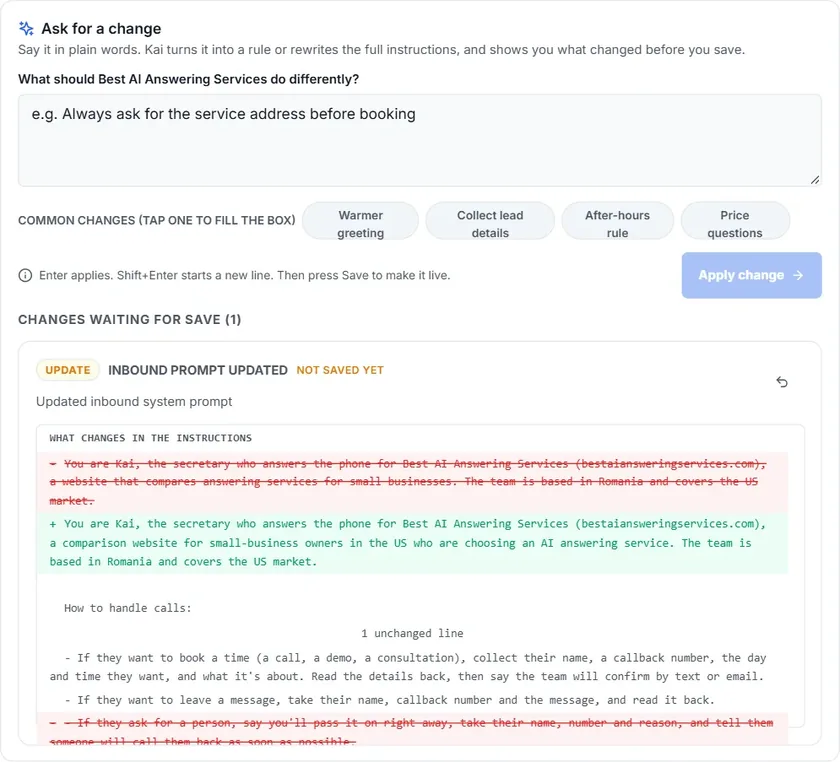
Yes. When an owner gives a website during sign-up, KaiCalls builds Kai's instructions from it (KaiCalls, by email, 19 October 2026), and the business profile, the details Kai uses on every call, has an Autofill from this website button under Business, then Profile. Our line was set up on KaiCalls' side without our site, so out of the box our Kai knew one line about us (“a website that compares answering services”) and a rule we would not want on a comparison site: “Only discuss products and services offered by Best AI Answering Services. Do not recommend external solutions.” That rule is sensible for a plumber and wrong for us, so before testing we gave Kai the same facts Upfirst and My AI Front Desk had read from our home page.
You do it in plain words. Under Ask for a change you type what should be different; Kai rewrites its own instructions (2,328 words on our line) and shows the change as a red and green diff, and nothing reaches callers until you press Save. We pasted our price list and four rules (never invent a price, take a message when someone asks for a person, take the details when a vendor says a price is wrong, and say our reviews cover US businesses). Kai kept every figure and dropped the no-recommendation rule.
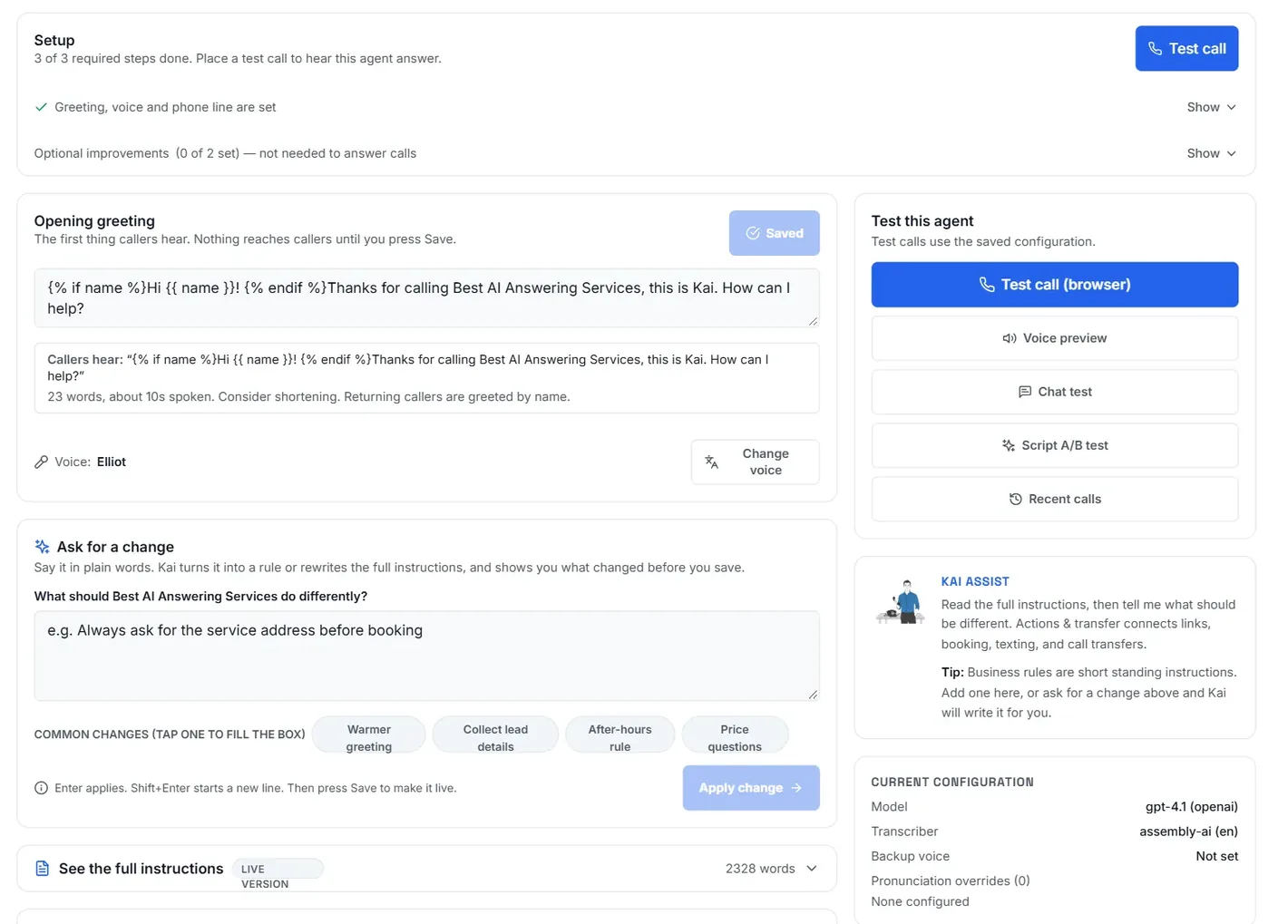
Three things on this page are worth knowing. The greeting box shows the template behind the greeting (“{% if name %}Hi {{ name }}!{% endif %}…”), which is how Kai greets a returning caller by name; it reads as code to an owner, so edit it with care. Business rules are short standing instructions added after the main script. And a Live traffic experiment answers half of your real calls with an alternative script until you stop it, which none of the other services we have reviewed offer. The configuration panel names the parts: OpenAI's gpt-4.1 for the conversation and AssemblyAI, set to English, for transcription.
What happened on our two test calls
We called from the browser twice on 19 October 2026: once with the questions we put to Upfirst and My AI Front Desk (5 minutes 20 seconds), and once with the three we had not reached the first time, an interruption, a request for a person and a vendor complaint (4 minutes 27 seconds). Each call landed in the call list within seconds, tagged (“Check this one”, “Wants a quote”), and each sent an email. Kai was answering for our comparison site, so the services it recommends below are the ones on our list; on your line it talks about your business, from what you teach it. The short answers, question by question, are in the next sections; the side-by-side with the other two agents is further down.
Does it give correct answers, or make things up?
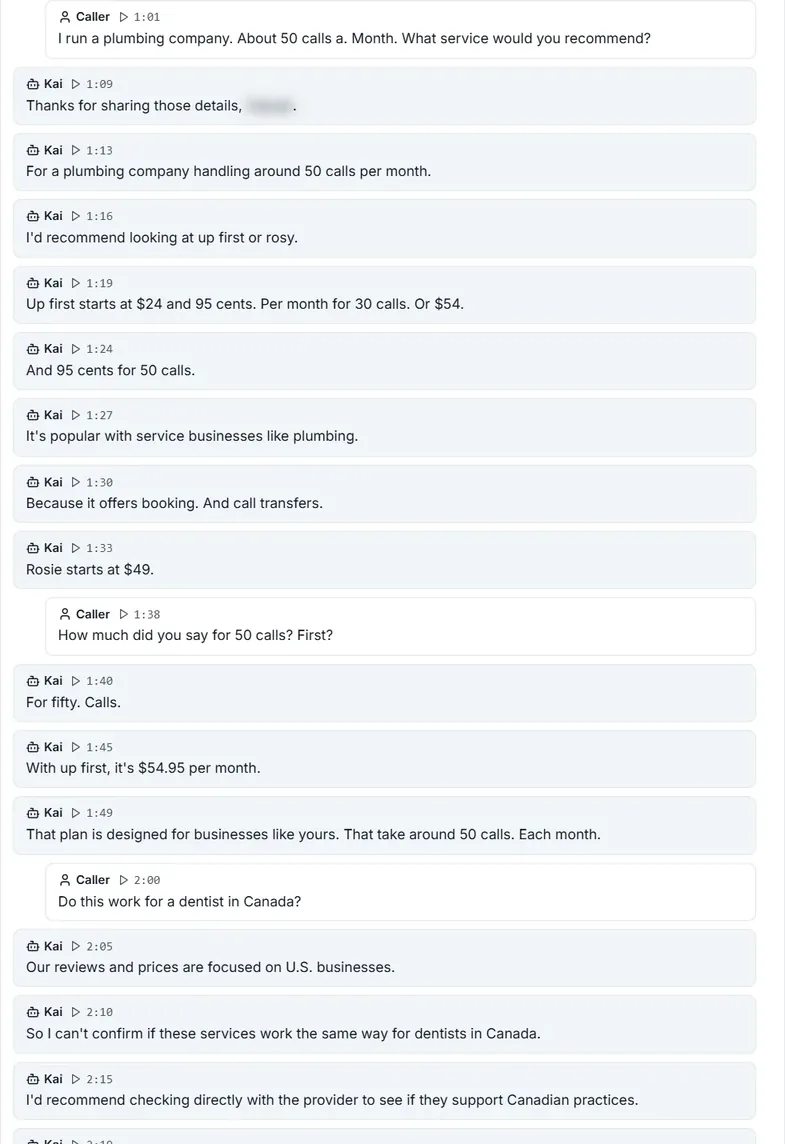
On the questions it had facts for, it was right. For a plumber with about 50 calls a month it suggested Upfirst or Rosie, gave Upfirst's $24.95 for 30 calls and $54.95 for 50 (the figure on our site, which Upfirst's own agent did not give us), and Rosie's $49. Asked whether the services work for a dentist in Canada, it said our reviews and prices focus on US businesses and that the dentist should check with the provider, which is what we had told it.
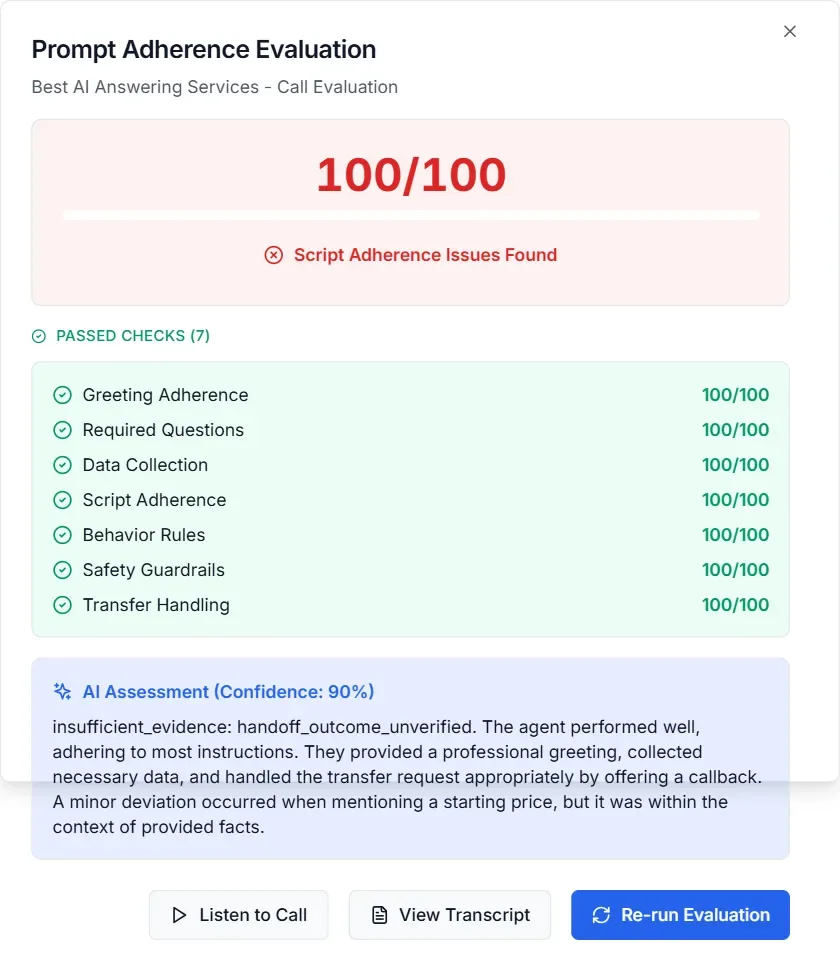
On the second call we asked for the cheapest service for a small HVAC company. Kai named Upfirst “starting at 20”. That is Upfirst's yearly-billed price, a real figure but not one we had given it, and the cheapest plan on our list is KaiCalls' own $10. KaiCalls' rules check caught it: the evaluation on the call page noted “a minor deviation occurred when mentioning a starting price”, while passing the call on greeting, required questions, data collection, behaviour rules, safety and transfer handling.
What happens when a caller interrupts?
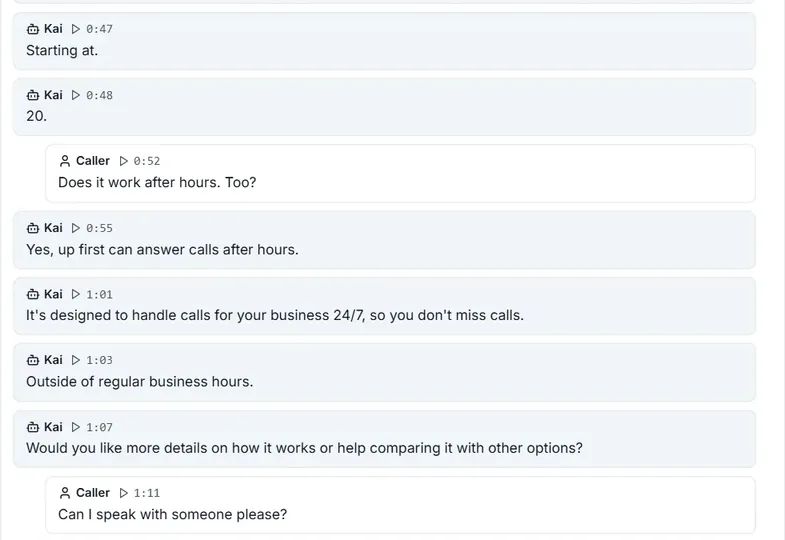
It stops and takes the new question. About fifty seconds into call 2, as Kai was giving Upfirst's starting price, we cut in with “Does it work after hours too?”. Kai answered that one (“Yes, Upfirst can answer calls after hours… 24/7”) and offered more detail or a comparison. On call 1 we asked it to wait (“One second, please”) and it did: “No problem, take your time. Just let me know when you're ready.”
Can it transfer a call to a person?
Yes, on every plan: KaiCalls' pricing page lists team routing, with options to ring team members first, screen the caller, introduce them or transfer straight away, and KaiCalls confirmed live transfer to us by email on 13 October 2026. Our line had no transfer number, by design, so when we asked “Can I speak with someone, please?” Kai said it could not transfer the call and offered a callback from the team instead, then asked for the best number. That is the behaviour we had asked for.
Does KaiCalls speak Spanish?
Yes, and well. English and Spanish are included on every plan, and a line can be set to up to four languages from a list of ten, with Kai following the caller's language (pricing page). On call 1 we asked it to switch and it carried on in Spanish without a pause; then, off script, we tried Romanian and it answered in Romanian too. Our caller, who speaks Romanian, rated the Spanish good and the Romanian perfect.
One setting to change first: our line's transcriber was set to English, so the Spanish and Romanian parts came out as garbled English words (“continuarial espanol”) in the transcript, the summary and the email. The two-channel recording keeps the audio either way, but if many of your callers speak another language, add it to the line so the transcripts are readable too.
Does it get names and numbers right?
It asks for both early and reads them back. It confirmed the caller's name on both calls, though its transcriber spelled it its own way. The callback number on call 2 took two tries: the first read-back dropped digits, the caller said no, and Kai asked for the number again “slowly, so I can make sure I have it exactly right” and read it back correctly. The number then appeared in the summary, the to-do and the email. Read-back with a correction is the behaviour you want; the first miss is why it matters.
How do you find out about a call?
By email, about a minute after the call ends, and on a call page. The email, from leads@updates.kaicalls.com, is headed “New message from” the caller's name with the call length, and carries a priority (“High priority”), a score (81/100 on both our calls), a recommended action, the reasons quoted from the transcript, a View Lead & Respond button, a summary and the full transcript. The two short false starts we made got emails too, as “Unknown caller”.
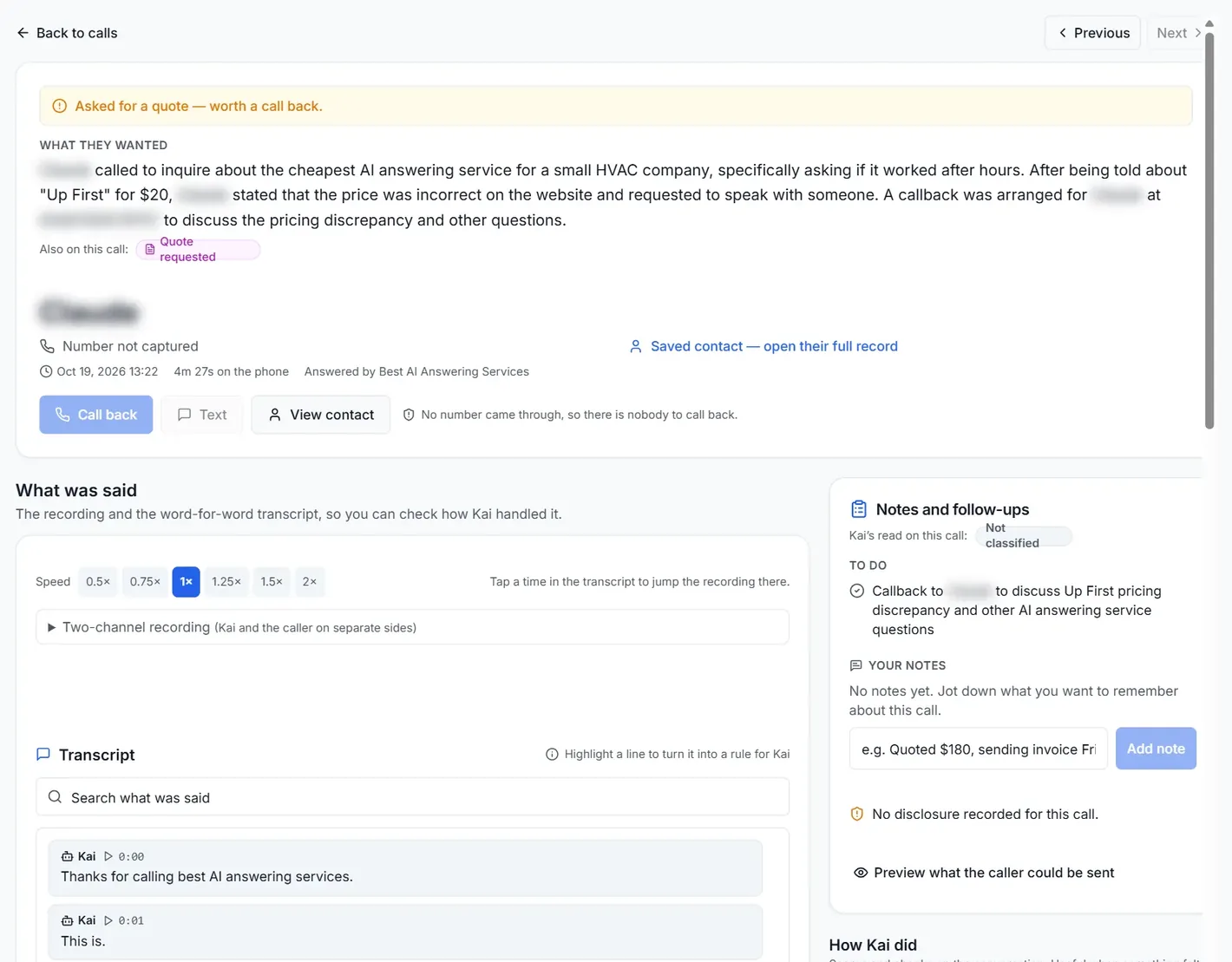
The call page adds what the email cannot: the recording with playback from 0.5× to 2×, a transcript you can click to jump the audio, a to-do Kai writes for you (“Callback to … to discuss Up First pricing”), a notes box, and a Highlight a line to turn it into a rule for Kai option, so a bad answer becomes a fix from the transcript itself. Web test calls carry no caller number, so the Call back button stays grey on them; real calls show the number.
Same questions, three agents
| KaiCalls (web calls, 5:20 and 4:27) | Upfirst (web call, 5:23) | My AI Front Desk (browser call, 3:52) | |
|---|---|---|---|
| What it knew | Our home page facts, typed in plain words (our line was set up without the site) | Built from our website | Built from our website and five answers |
| Plumber, 50 calls a month | Upfirst or Rosie, with both starting prices | Dialzara for short calls, Upfirst for features | Upfirst, Dialzara and Rosie |
| Upfirst's price at 50 calls ($54.95 on our site) | $54.95 | Gave the 150-call range; offered a follow-up | $54.95, with the date checked |
| Dentists in Canada | Reviews focus on US businesses; check with the provider | Focus is the US | Mainly US; many listed services work in Canada |
| Interrupted mid-answer | Stopped and answered the new question | Stopped and took the new question | Stopped (“No problem, go ahead”) |
| Switch to Spanish | Fluent Spanish, and Romanian when we tried it; transcript set to English | Immediate; shown translated | Not asked |
| “Can I speak with someone?” | No transfer set; offered a callback, took the number | Web test mode: offered a message | Test session: cannot transfer |
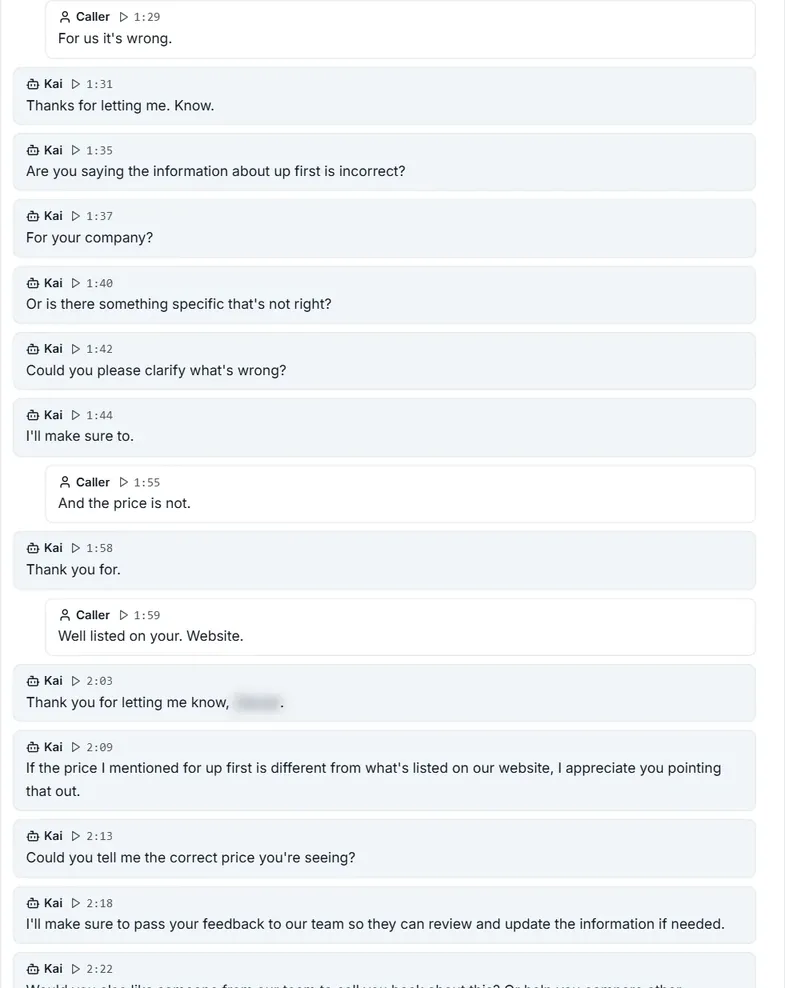
| Vendor says the price is wrong | Asked what was wrong and the correct price; passed it on | Follow-up offered; took name and number | Callback intake |
| Where the call went | Email in about a minute with priority and score; call page with two-channel recording | Calls page in seconds; recording and transcript | Email and a call page with the recording |
None of the three had a transfer number. The Upfirst and My AI Front Desk calls are transcribed in the Upfirst review and the My AI Front Desk review.
All three agents we have called side by side, with costs at the same volumes: Upfirst vs My AI Front Desk vs KaiCalls.
Who it's for
- Good fit: an owner who answers most calls and wants the missed ones caught for $10 a month; anyone who wants to know which calls matter without listening to all of them (of the services we have tested, it is the only one that ranks each call by priority and score in the email); and owners who would rather tell the agent what to change in a sentence than fill in forms.
- Check first: that Kai has your website (given at sign-up, or with Autofill from this website in the business profile) and your prices and rules; the languages set on the line if your callers speak Spanish or another language, so the transcripts are readable (the spoken Spanish and Romanian were good); and the approximate allowances, if Kai will answer every call rather than the missed ones.
- Look elsewhere if you want a 14-day free trial with no card (Upfirst, our review), or a signed BAA for patient calls (KaiCalls does not offer one; RingCentral and AptaBook do). All are on our home page.
What this page covers. The setup, the agent page, teaching the line in plain words, two browser test calls with their transcripts, the call pages and the emails, as captured on 19 October 2026. Browser calls carry no caller number, so texting and calling the customer back are features of calls to the line's number.
More questions owners ask
Can I keep my business number with KaiCalls?
Yes, two ways. Forward your existing line to your Kai number, either every call or only the ones you don't pick up, or port the number in; the pricing page lists porting on every plan. The dashboard links to forwarding instructions and to porting from the first screen.
What happens if KaiCalls answers more calls than my plan includes?
There is no per-minute overage. The allowances are approximate (about 20, 170 and 800 answered calls), and KaiCalls told us on 13 October 2026 that the service keeps answering when you go over: it recommends the next plan and you can keep your current one. The pricing page says the same, and that you are moved back down if your volume drops.
Does KaiCalls record calls?
Yes, when recording is on. Our call pages had a two-channel recording (Kai on one side, the caller on the other) with playback from 0.5× to 2×, and a transcript you can click to jump the audio. The email after each call carries the summary and the full transcript, not the audio.
Is there a contract?
No. No setup fee, no annual contract, cancel anytime, and a 30-day money-back guarantee on paid plans, per the pricing page on 19 October 2026. The first week is $2.
Does KaiCalls book appointments and connect to a CRM?
Yes. The pricing page lists Google Calendar, GoHighLevel, HubSpot, Salesforce, ServiceTitan, Jobber and Housecall Pro, plus Zapier, Make and a REST API, on every plan; connected services may charge separately. Our test line was not connected to a calendar.
Is KaiCalls HIPAA compliant?
KaiCalls told us on 13 October 2026 that it does not offer a business associate agreement (BAA) today, so it is not the right choice for calls that carry patient information.
Does KaiCalls tell callers it is an AI?
When asked directly. Its instructions on our line told it to answer “Are you an AI?” honestly (“Yes, I'm an AI assistant helping with calls for…”). The greeting introduces it by name, Kai, and the call page shows whether a disclosure was recorded on each call.
How many reviews does KaiCalls have?
Very few so far: one on Capterra on 19 October 2026, a five-star review submitted at the vendor's invitation (Capterra), and none on G2. The service is new, which is why we tested it ourselves.
Sources and method
- KaiCalls dashboard (kaicalls.com), a line set up for this site by KaiCalls with the first month of Kai Line waived: the overview, the setup checklist, the agent page and its configuration, one plain-language change to the instructions, two browser test calls of 5 min 20 s and 4 min 27 s with their call pages, transcripts and rules checks, and the lead emails sent to our address, read and captured on 19 October 2026. The caller's name and number are blurred.
- KaiCalls pricing page (vendor-published), read 19 October 2026
- KaiCalls by email to us, 13 October 2026: overage, live transfer and BAA; and 19 October 2026: Kai's instructions built from the website given at sign-up (the Autofill from this website button seen in the business profile the same day)
- Capterra and G2 listings for KaiCalls, read 19 October 2026
- The Upfirst and My AI Front Desk test calls of 16 October 2026, from our own reviews