Upfirst vs My AI Front Desk vs KaiCalls: three AI receptionists, one test call
We set up all three ourselves and called each with the same questions. Here is what they cost at the same call volumes, how they set up, and how they handled the call.
How we compared them. We set up all three ourselves, with this site as the business: an Upfirst trial account and a My AI Front Desk account on 16 October 2026, and a KaiCalls line on 19 October 2026. Then we called each one from the browser with the same questions: a recommendation for a plumber with 50 calls a month, a price, a question outside the US, an interruption, a request for a person and a complaint about a price. Prices come from inside each app or the vendor's pricing page on the same days. No vendor paid for this page; links may earn us a commission (disclosure).
The short answer
- Upfirst if you want the most complete receptionist for a small service business: built from your website in minutes, booking, texts and transfers on every plan, and a 14-day trial with 100 calls and no card. From $24.95 a month for 30 calls. Our Upfirst review.
- My AI Front Desk if you want calls, texts, a website chatbot, email replies and forms in one $99 plan, and the recording and transcript of every call in your inbox. Our My AI Front Desk review.
- KaiCalls if you answer most calls yourself and want the missed ones caught for $10 a month, with an email that ranks each call by priority. Our KaiCalls review.
- Upfirst
- Per call: $24.95 for 30, $59.95 for 90, $159.95 for 300, $299.95 for 600; 14 days and 100 calls free, no card
- My AI Front Desk
- Per minute: $99 for 200 minutes plus 1,000 credits, then $0.25 a minute; 7-day trial that starts as a subscription
- KaiCalls
- Per answered call: $10 for about 20, $79 for about 170, $349 for about 800; $2 for the first week
- Built from
- Your website, for all three (KaiCalls at sign-up or with its Autofill button, per KaiCalls); our KaiCalls line was set up without the site, so we taught it in plain words
- All three
- Answered our test calls, stopped when interrupted, refused to invent what they did not know, and sent a summary and transcript after the call
Which one is cheapest?
It depends on how many calls the AI answers. Each one counts differently: Upfirst per call, My AI Front Desk per minute, KaiCalls per answered call with approximate allowances. Here is the cheapest plan of each at the same volumes, with two-minute calls:
| Calls a month | Upfirst | My AI Front Desk | KaiCalls |
|---|---|---|---|
| 20 calls | $24.95 (Starter) | $99 (Business-in-a-Box) | $10 (Kai Backup) |
| 50 calls | $54.95 (Starter) | $99 (Business-in-a-Box) | $79 (Kai Line) |
| 100 calls | $69.95 (Premium) | $99 (Business-in-a-Box) | $79 (Kai Line) |
| 150 calls | $119.95 (Premium) | $114 (Business-in-a-Box) | $79 (Kai Line) |
| 200 calls | $159.95 (Pro) | $139 (Business-in-a-Box) | $349 (Kai Office) |
| 300 calls | $159.95 (Pro) | $189 (Business-in-a-Box) | $349 (Kai Office) |
Upfirst adds $1.50 a call on Starter and $1.00 on Premium above the allowance; My AI Front Desk adds $0.25 a minute above 240 minutes (200 plus the credits). KaiCalls has no overage: above the allowance the line keeps answering and KaiCalls recommends the next plan, so we price the plan that covers the calls. If KaiCalls only answers the calls you miss, $10 covers about 20 of them. Taxes and phone fees excluded.
With two-minute calls the cheapest of the three changes with volume: KaiCalls up to about 20 calls ($10, answering the ones you miss), Upfirst from 25 to about 105, KaiCalls' $79 plan from about 110 to 170, My AI Front Desk from about 175 to 240 (its 200 minutes plus credits cover them before the per-minute charge adds up), and Upfirst's $159.95 plan from about 245 to 400. With three-minute calls My AI Front Desk is never the cheapest, because it is the only one of the three that bills by the minute. It is also the only one whose plan includes a website chatbot, email replies and forms. Our calculator runs the same sums for fourteen services at your own volume and call length.
Which has the best free trial?
| Upfirst | My AI Front Desk | KaiCalls | |
|---|---|---|---|
| Trial | 14 days and 100 calls | 7 days | $2 for the first week |
| Card needed | No | Yes: the trial is a subscription, $0 today and $99 on day eight unless you cancel | Yes |
| Before the trial | Everything is open | Build and test-call from the browser on 300 demo credits (about 12 minutes); settings and call log locked | A free browser demo |
| Test calls | Web calls free and not counted | 25 demo credits a minute | Browser test calls from the agent page |
| Guarantee | Not needed: nothing to cancel | Check the cancellation terms first | 30-day money-back on paid plans |
Upfirst's is the easiest to try: no card, and every screen is open from the first minute. With My AI Front Desk you can build the receptionist and hear it before paying, but the rest of the app opens only once the subscription trial starts. KaiCalls asks $2 for the first week, and set our line up for us.
Which is fastest to set up?
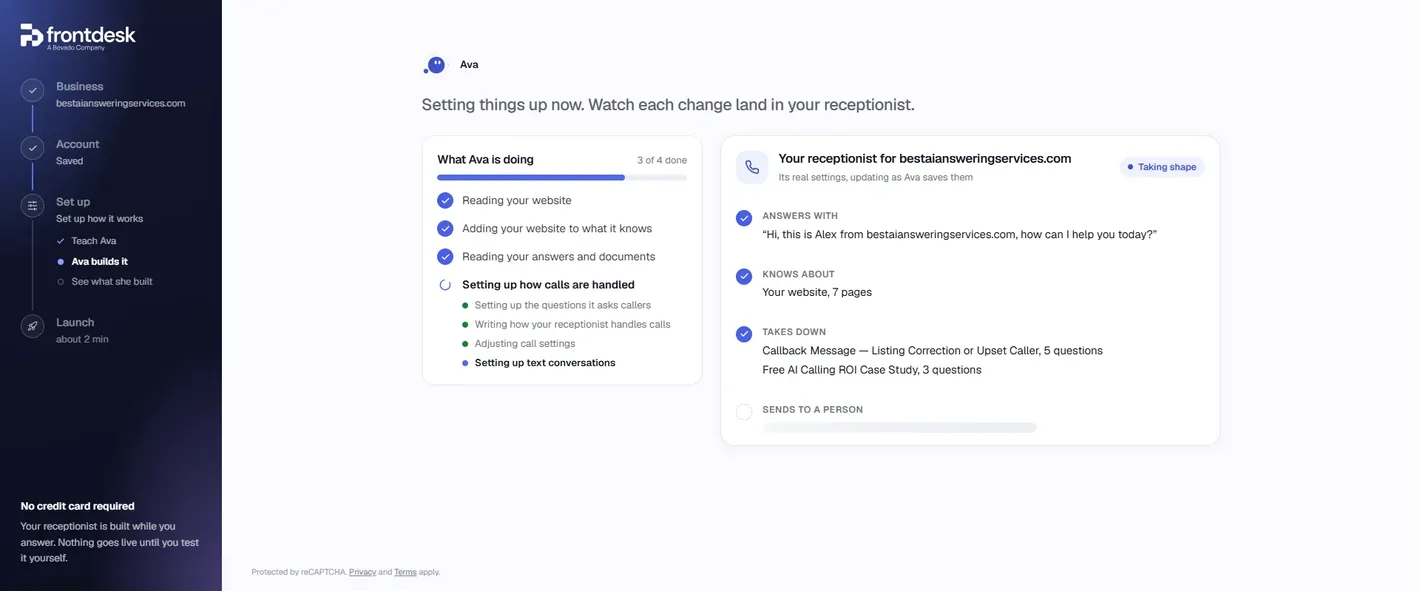
All three can build the receptionist from your website. Upfirst and My AI Front Desk read ours during setup and wrote it for us; KaiCalls builds Kai's instructions from the website you give at sign-up, or later with an Autofill from this website button in the business profile (per KaiCalls, 19 October 2026).
- Upfirst: a seven-step wizard (basics, training, knowledge, questions, voice, greeting, phone number). It read our pages and wrote its own knowledge, the questions to ask callers and the text messages to send.
- My AI Front Desk: an assistant called Ava reads your site, asks five questions (or talks with you for two minutes) and builds the receptionist while you watch, with a change log you can undo. About ten minutes for us.
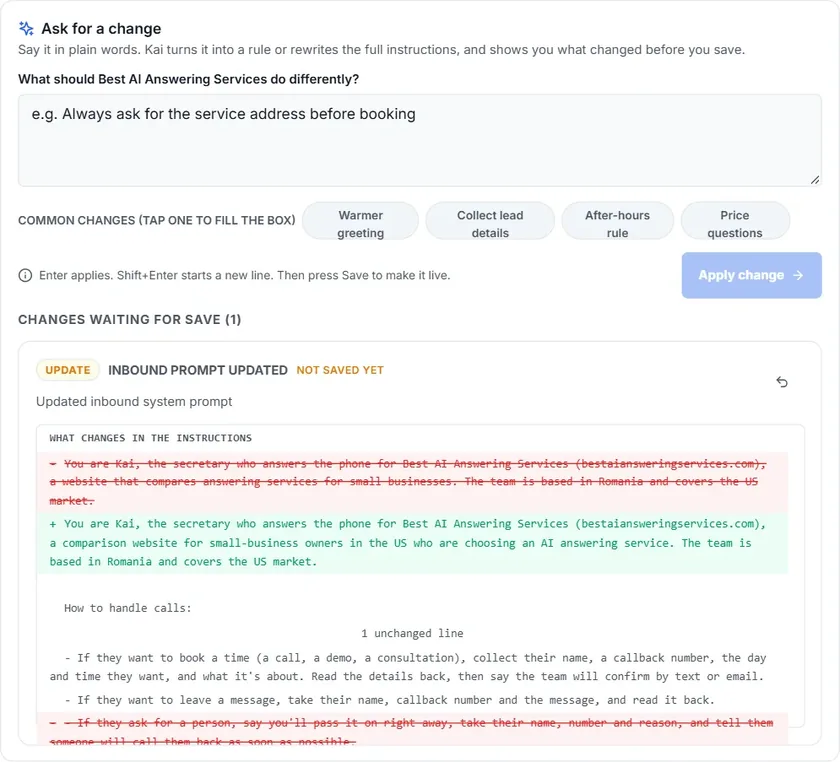
- KaiCalls: our line was set up by KaiCalls without our site, so it came with a greeting, a voice and one line about us. To teach it the rest, we typed what should change under “Ask for a change”, and Kai rewrote its own instructions and showed them as a red and green diff before we saved. Quick once your prices and rules are written down.
Which answered our test call best?
All three did well, and each was best at something different. Same questions, browser calls, no transfer number on any of them:
| Upfirst | My AI Front Desk | KaiCalls | |
|---|---|---|---|
| Plumber, 50 calls a month: what do you recommend? | Dialzara for short calls, Upfirst for features | Upfirst, Dialzara and Rosie | Upfirst or Rosie, with both starting prices |
| Upfirst's price at 50 calls ($54.95 on our site) | Gave the 150-call range; offered a follow-up | $54.95, with the date checked | $54.95 |
| Dentists in Canada | Focus is the US | Mainly US; many listed services work in Canada | Reviews focus on US businesses; check with the provider |
| Interrupted mid-answer | Stopped and took the new question | Stopped (“No problem, go ahead”) | Stopped and answered the new question |
| Switch to Spanish | Immediately; shown translated in the call log | Not asked | Fluent, and Romanian when we tried it |
| “Can I speak with someone?” | Web test mode: offered a message | Test session: cannot transfer | Offered a callback and took the number |
| A vendor says our price is wrong | Offered a follow-up; took name and number | Callback intake: name, then number | Asked what was wrong and the correct price; passed it on |
| Getting details right | Email not read back | Email read back wrongly and a yes accepted | Phone number misread, then corrected on the second read-back |
Upfirst and My AI Front Desk were built from our website; our KaiCalls line, set up without the site, from the same facts typed in plain words. Each was answering for our comparison site, so the services they recommend are the ones on our list. Full transcripts are in each review.
The pattern: none of the three made up an answer it did not have, and all three handled an interruption naturally. My AI Front Desk and KaiCalls gave the exact price from our site; Upfirst preferred to offer a follow-up. Upfirst and KaiCalls switched languages on request. Where all three can slip is reading back an email or a phone number, so check those on your own test call.
Can they transfer calls, book, text and speak Spanish?
| Upfirst | My AI Front Desk | KaiCalls | |
|---|---|---|---|
| Transfer to a person | Yes, with rules per reason | Yes, from the setup questions | Yes: ring the team first, screen, introduce or transfer |
| Booking | Google, Outlook, Calendly, Acuity, Square, Clio | Calendar on the plan | Connected calendar; also ServiceTitan, Jobber, Housecall Pro |
| Texts to callers | Yes, on calls to the number | 400 texts a month included | Yes, after carrier approval |
| Spanish | Yes (switched on our call) | Not asked on our call | Yes; up to 4 of 10 languages per line |
| What the plan covers | Phone calls and texts | Calls, texts, a website chatbot, email replies and web forms | Calls, texts and WhatsApp, email campaigns |
| Keep your number | Forwarding | Forwarding | Forwarding or porting |
| BAA for patient calls | On custom plans over 600 calls | Claimed on the homepage only | Not offered today (per KaiCalls) |
Which tells you about a call best?
- Upfirst is the fastest: the call appears in the Calls page within seconds, tagged, summarized and transcribed, with the recording.
- My AI Front Desk emails you within a minute with a summary and the full transcript, plus a link to a call page with the recording that opens without logging in.
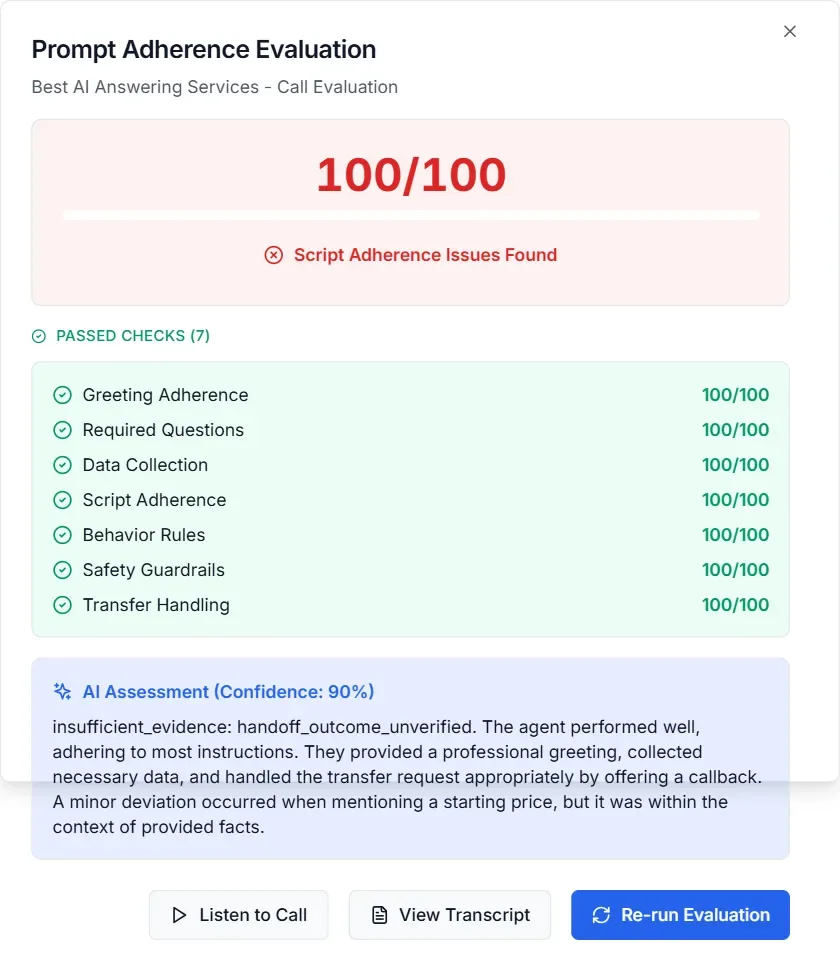
- KaiCalls sends an email about a minute after each call with a priority (“High priority”), a score out of 100, a recommended action and the reasons, then the summary and the transcript. The call page adds a two-channel recording, a to-do Kai writes for you and a rules check that grades the call. If you get many calls and want to know which to return first, this is the most useful of the three.
Which one should you choose?
- A plumber, HVAC shop or salon with 25 to 100 calls a month, or 250 to 400, that wants bookings and transfers: Upfirst. It is the cheapest of the three at those volumes, books on the common calendars and costs nothing to try for two weeks.
- A business that also wants its website chat, email replies and forms handled by the same AI, or about 175 to 240 short calls a month: My AI Front Desk, at $99 a month plus $0.25 a minute above 240 minutes. Use the seven days to test hard, and read the cancellation terms first.
- An owner who answers the phone and only wants the missed calls caught: KaiCalls at $10 a month, ringing your phone first. Between about 110 and 170 calls a month its $79 plan is also the cheapest of the three.
- Calls in Spanish or another language: Upfirst or KaiCalls, both of which switched on our calls.
Eleven more services, from $19 to over $200 a month, are compared on our home page, and every service we have tested from the inside is on our reviews page.
Questions owners ask
Is Upfirst better than My AI Front Desk?
For a phone-only service business, usually yes on price and trial: Upfirst starts at $24.95 for 30 calls, bills per call rather than per minute, and gives 14 days and 100 calls without a card. My AI Front Desk is better value if you will also use its website chatbot, email agent and forms, which are included in the $99 plan. On our test calls both were accurate; My AI Front Desk gave the exact price from our site where Upfirst offered a follow-up.
Is KaiCalls a real receptionist or just voicemail?
A real AI receptionist. On our calls it answered questions, gave prices it had been taught, switched to Spanish and Romanian, took a callback number and passed on a complaint. It is built to answer the calls you miss, with your phone ringing first, but you can forward every call to it.
Which is cheapest for 100 calls a month?
With two-minute calls on 19 October 2026: Upfirst $69.95 (Premium, 90 calls plus 10 at $1.00), KaiCalls $79 (Kai Line, about 170 calls) and My AI Front Desk $99. With three-minute calls My AI Front Desk rises to $114, because it bills by the minute; the other two do not change.
Do all three record calls and send transcripts?
Yes. Upfirst shows the recording and transcript on its Calls page within seconds. My AI Front Desk emails a summary and transcript within a minute, with a link to the recording. KaiCalls emails a summary, transcript, priority and score within about a minute, and keeps a two-channel recording on the call page.
Can I keep my business number?
Yes with all three, by forwarding your line to the number the service gives you (every call, or only the ones you miss). KaiCalls also ports numbers in on every plan.
Sources and method
- Our own Upfirst trial account and My AI Front Desk account, opened with this site's details on 16 October 2026, and a KaiCalls line set up for this site on 19 October 2026: setup, settings, in-app prices and browser test calls with the same questions, transcribed in the Upfirst review, the My AI Front Desk review and the KaiCalls review.
- Upfirst, My AI Front Desk and KaiCalls pricing pages (vendor-published), read 16 and 19 October 2026; costs computed with the same model as our home page calculator.
- KaiCalls by email to us, 19 October 2026: Kai's instructions built from the website given at sign-up, with an Autofill from this website button in the business profile (seen in our dashboard the same day).